By Kerry Lombard, Gaffer, 35 years of grip and lighting experience · Updated 11/23/2026
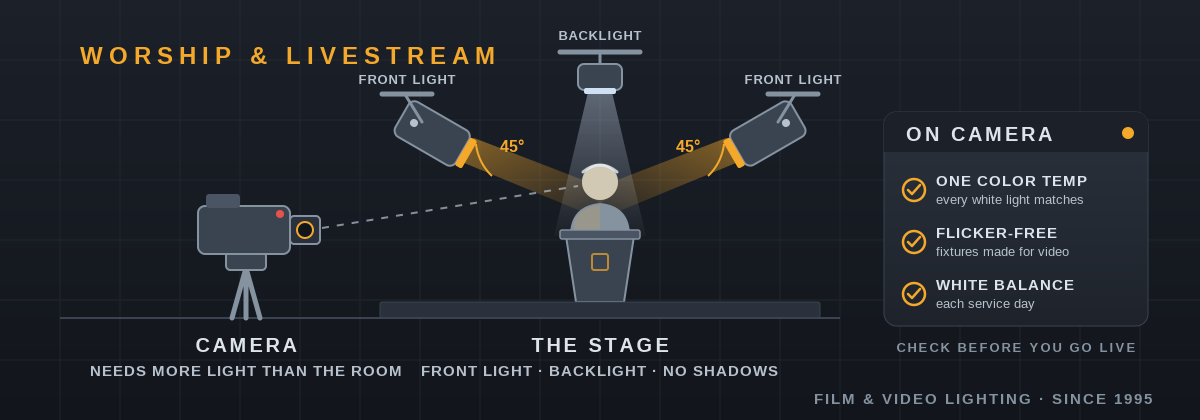
Short answer: A camera needs more light, and more even light, than the people in the room. Light faces from the front at about 45 degrees from each side instead of straight down, add backlight from above and behind to separate people from the background, keep every white light the same color temperature, use flicker-free fixtures made for video, and white balance your cameras each service day with the lights at their normal levels.
| Light | Where it goes | What it does |
|---|---|---|
| Front light | Out front, about 45 degrees to each side of the person and aimed down at about 45 degrees | Lights faces evenly, without the dark eyes and nose shadows you get from lights straight overhead |
| Backlight | Above and behind the stage, aimed down at about 45 degrees onto heads and shoulders | Separates people from the background, so the picture has depth |
| Background | Washes, LED strips or moving lights on the back wall and set | Gives the stream something to see behind the speaker; color can change with each song or series |
| Job | From our store | Why it works |
|---|---|---|
| Front light on the pulpit and platform | ETC Source 4 LED | Shaped front light with shutters, so you can keep light off screens and the back wall |
| Soft light for small stages, interviews and announcements | Kino Flo LED (Celeb, Diva-Lite, FreeStyle) and the Chauvet onAir Panel 2 IP | Large, soft sources that flatter faces, with DMX control |
| Backlight and color | LED fixtures | Separation and color behind the speaker |
| Control | Lighting consoles | Save your service looks so volunteers can bring them back with one button |
| Atmosphere | Haze machines | Makes beams and backlight show up on camera |
Usually because the lights are straight overhead. Light from above casts shadows under brows and noses. Aim front light at the stage from about 45 degrees out front instead, and add more of it.
Fixtures or bulbs with different color temperatures are mixed together, or daylight from windows is mixing with stage light. Match the fixtures, tint or cover the windows, and white balance with the lights at service levels.
No, but a light haze makes beams and backlight show up on camera. Read our haze and fog guide first, especially the part about smoke detectors.
Often, yes. Start by re-aiming what you have, adding backlight and matching color temperature. Send us photos of your stage and a list of your fixtures, and we'll tell you what to keep and what to add.
Tell us about your room, your cameras and the fixtures you have, and we'll put together front light, backlight and control that fit your budget. We've supplied lighting for film, broadcast, worship and live events since 1995, and a real expert answers the phone. Call 888-276-3667.
Shop Church & Worship Lighting »
Shop ETC Source 4 LED »
Shop Kino Flo LED »
Compare Lighting Consoles »
Read: More Guides in the Learning Center »
Every room is different. The right fixtures depend on your stage size, ceiling height, cameras and power.



© Barn Door Lighting Outfitters LLC.